Your first plugin
From an empty folder to a panel running inside Tintero, with nothing installed but a zip command.
On this page
A plugin is a folder with two files in it, zipped. No build step, no toolchain, no account. You can have one running in the time it takes to read this page.
What you are building
A sidebar panel that counts the words in whatever document is open, and updates when you switch to another one.
word-count/
  plugin.json    ← who you are, where you show up, what you are allowed to touch
  plugin.js      ← all your JavaScript
  plugin.css     ← optional, loaded for you
  icon.svg       ← optional, SVG only
1. The manifest
Every plugin declares itself in plugin.json.
{
  "id": "com.example.word-count",
  "name": "Word Count",
  "version": "1.0.0",
  "description": "A live word count for the document you are writing",
  "author": { "name": "Your Name" },
  "license": "MIT",
  "type": "sidebar-panel",
  "surfaces": ["sidebar"],
  "main": "plugin.js",
  "scopes": ["ui.sidebar", "editor.read"],
  "ui": { "sidebar": { "label": "Words", "tooltip": "Live word count", "width": 260 } }
}
Two of those fields do most of the work:
surfacesis where you show up.sidebaris the narrow panel. There are three other places, covered in Surfaces.scopesis what you are asking permission to do. ui.sidebar lets you draw a panel, editor.read lets you read what someone is writing. They approve the list once, at install, and every call you make afterwards is checked against it.
type is the older version of surfaces, from back when a plugin could only be one thing. It is
still required, so write both. If they disagree, surfaces wins.
2. The code
(function () {
  const plugin = new TinteroPlugin();

  plugin.onActivate = async function () {
    document.body.innerHTML = `
      <style>
        .box { padding: 10px; font-family: inherit; }
        .count { font-size: 28px; font-weight: 600; color: var(--accent-color, #c98a48); }
        .label { color: var(--text-secondary, #a98e6b); font-size: 12px; }
      </style>
      <div class="box">
        <div class="count" id="count">0</div>
        <div class="label">words</div>
      </div>`;

    const refresh = async () => {
      const words = await tintero.editor.getWordCount();
      document.getElementById('count').textContent = words;
    };

    await refresh();
    tintero.events.on('editor.activeDocumentChanged', refresh);
  };

  registerPlugin(plugin);
})();
Three things are worth pointing at.
new TinteroPlugin() makes your plugin object and registerPlugin(plugin) hands it to
the app. Call that exactly once, right at the end. Call it twice and the second one is ignored,
with a warning in the console.
onActivate is where you build your interface and load your data. It runs once every time
your plugin starts, in each place it is showing.
tintero is how you talk to the app. Everything on it returns a promise, because every call
is a message out and an answer back.
3. Package it
cd word-count && zip ../word-count.zip plugin.json plugin.jsThat is the entire build. If you have a plugin.css, add it too: a stylesheet named after your
main file gets loaded automatically.
4. Load it
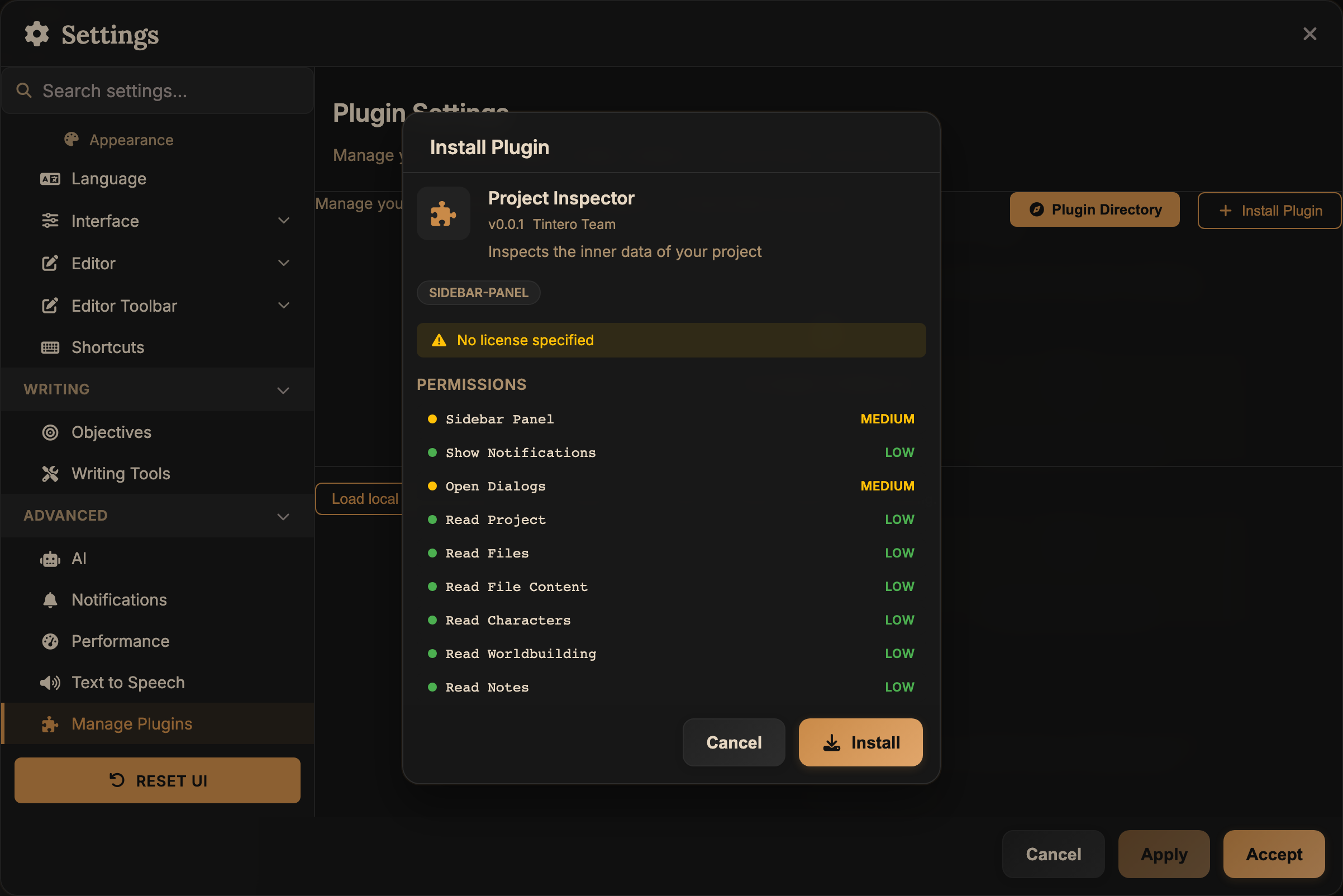
In Tintero: Settings → Plugins → Load local plugin (dev), then pick the zip.
You get the permission dialog, listing exactly what your manifest asked for. Approve it and your panel shows up in the sidebar.
5. Iterate
Change your code, rebuild the zip, press Reload. Turn on Auto-reload and you can stop pressing anything: Tintero watches the file and restarts the plugin whenever it changes.
What to know before you go further
Your code is boxed in. No reaching the app’s page, no cookies, no localStorage, no network
from inside your frame. Use tintero.storage to keep things and tintero.net.fetch to get
online. Both are in the security model.
Every call is checked. Permissions every time, plus 100 calls / 1 s, an argument cap of 5 MB, and a 30 s timeout. Ordinary code never gets close to any of them.
Document text is not HTML. It is ProseMirror JSON, handed to you as a string, with converters for text, HTML and Markdown. See Document content.
Grab the type definitions. tintero-plugin-sdk.d.ts describes the
whole API and the manifest. Drop it next to your source and your editor will catch a misspelled
permission long before you package anything.
const manifest: TinteroSDK.PluginManifest = {
  scopes: ['project.write.fileContents'],
  //       ~~~~~~~~~~~~~~~~~~~~~~~~~~~~
  //       Type '"project.write.fileContents"' is not assignable to type 'PluginScope'.
  //       Did you mean '"project.write.fileContent"'?
};
Where next
- Development workflow: the fast loop, and how to build with the app closed.
- Surfaces: the sidebar is one of four places you can appear.
- API reference: everything
tinterocan do. - Permissions: what each one unlocks, and how risky people are told it is.
- Example plugins: the four that ship, readable end to end.